Opt-in login startup
App identity and the owned registry value
| What | Value |
|---|---|
| Key | HKEY_CURRENT_USER\Software\Microsoft\Windows\CurrentVersion\Run |
| Value name | ElevenClockRust (REG_SZ) |
| Value data | "<absolute path to elevenclock-rs.exe>" --startup; in managed mode "<folder>\elevenclock-rs-launcher.exe" --startup (see below) |
| Windows’ own flag | HKCU\...\Explorer\StartupApproved\Run, value ElevenClockRust (read; deleted when the user turns startup on or off here) |
The legacy ElevenClock writes elevenClock to the same key. Registry value names are
case-insensitive, so the Rust app’s name differs by more than case
(startup::tests::value_name_never_collides_with_the_legacy_app). Nothing else is ever
written, deleted or read for writing: no HKLM, no service, no scheduled task, no UAC.
--startup is the runtime’s private launch marker (instance::STARTUP_MARKER): it
starts the clock quietly, never opens Settings, and does nothing when an instance is
already running (the existing per-user mutex).
Managed mode: the launcher is the registered program
When elevenclock-rs-launcher.exe sits in the app’s own folder, the copy is managed
(ADR 0004). The Startup option is unchanged: it is
still the user’s choice, still off by default, and still only the ElevenClockRust
value. Only the registered program differs:
startup_targetis the one resolver. If the sibling launcher exists, the command is"<folder>\elevenclock-rs-launcher.exe" --startup, so each sign-in goes through the launcher and picks up updates; otherwise it is the app as before. The file name is fixed and looked up in the app’s own folder only, never from configuration, the environment or the registry.reconcileaccepts both the app and the sibling launcher (each with exactly--startup) as this copy’s:On, orDisabledInWindowswhen Windows switched it off. The sibling launcher counts only while it exists: a removed launcher reads asStale::Missing, and Repair resolves the target again (so it registers the app). A launcher in any other folder reads asOtherCopyorMissing, neverOn.- An entry that already points at the app stays
Onafter the launcher is added, and Repair is only offered for stale entries. Until the user turns Startup off and on again (which registers the launcher), sign-in starts the app directly and skips the launcher’s update step. - Diagnostics show
Managed: yes/noandStartup: app / launcher / off / stale, without paths.
What the user gets
Settings → Startup:
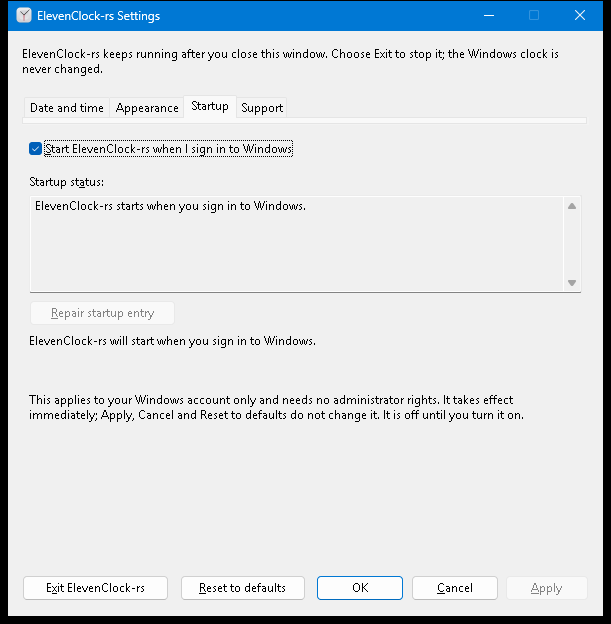
| Control | Behaviour |
|---|---|
Start ElevenClock-rs when I sign in to Windows (Alt+S) | The registration itself. Off by default. Acts immediately (it is OS state, not a draft: Apply, Cancel and Reset to defaults never touch it). After every action the page is rewritten from what the registry holds, so the box can only show the truth |
| Startup status (read-only text) | One of the states below, in words |
Repair startup entry (Alt+R) | Enabled only when the entry is stale; re-points it at this executable |
| Result line | “ElevenClock-rs will start when you sign in to Windows.”, “…will no longer start…”, or the failure and “Startup was not turned on/off.” Raises a screen-reader alert like the other status lines |
The page is read again whenever it is opened (also with Ctrl+PageDown), because Task
Manager and Windows Settings can change the registration while Settings is open.
States
| State | Registry | Checkbox | Words |
|---|---|---|---|
| Off | no value | clear | “does not start when you sign in” |
| On | exact quoted command for this executable, not switched off in Windows | checked | “starts when you sign in” |
| Switched off in Windows | same, but the StartupApproved flag is off | clear | “Windows has it turned off. Select the checkbox to turn it back on, or use Windows Settings, Apps, Startup.” Selecting the box deletes only this value’s flag |
| Stale: moved or deleted | quoted path that no longer exists (a portable copy was moved) | checked, Repair enabled | names the old path; “Choose Repair startup entry … or clear the checkbox to remove the entry” |
| Stale: another copy | path that exists but is not this executable | checked, Repair enabled | names the other copy |
| Stale: unrecognised | unquoted path, other arguments, not text | checked, Repair enabled | “not one ElevenClock-rs recognises” |
| Registry unreadable | read error | disabled | the Windows reason; never reported as “off” |
A stale or moved entry is never rewritten silently: launching the app, opening the page and unticking the box all leave it alone; only the Repair button (or ticking the box when it is clear) writes. Startup is never enabled on the user’s behalf.
Rules implemented (clock-windows::startup, tested on any host)
startup_target: the sibling launcher when it exists, otherwise the executable.command_line: absolute path only, wrapped in one pair of double quotes, followed by--startup. Refused (with a plain message, before the registry is touched): relative paths, a"or control character, and anything of 32,767 UTF-16 units or more.split_commandreads a value the way the shell does; only the quoted form counts as ours (an unquoted path with spaces would be split by Windows at the first space).reconcilecompares paths case-insensitively and checks the registered file with an injectedexists, so no test needs a file system.- Failures keep the OS and the UI in step: the controller never assumes success; the window reads the state back and shows that.
Installer cooperation and uninstall contract
- The installer registers nothing itself: startup stays an in-app, opt-in choice.
- Uninstall removes only the Rust-owned registration: delete the
ElevenClockRustvalue fromHKCU\Software\Microsoft\Windows\CurrentVersion\Runand, if present, theElevenClockRustvalue from...\Explorer\StartupApproved\Run, for the user running the uninstaller. It must never touchelevenClock, never write HKLM, and never kill or remove the legacy ElevenClock. - A value that points at a different executable is left to the user (Repair or untick), so a side-by-side portable copy is never broken by another copy’s uninstall: the uninstaller should delete the value only when it names the installed executable.
- The installed and portable copies share the value name on purpose: only one app identity can start at sign-in, and the page shows which copy owns it.
Known limits
- The page does not watch the registry: a change made while the Startup page is on screen appears the next time the page is opened or an action is taken.
- A registration that points at a UNC or removable path is reported as moved when that location is unreachable at the time Settings is opened, even though it may work later.
- Group Policy or an administrator can remove or block Run entries; the page shows what is there, and nothing here can override such a policy.