Any format you like
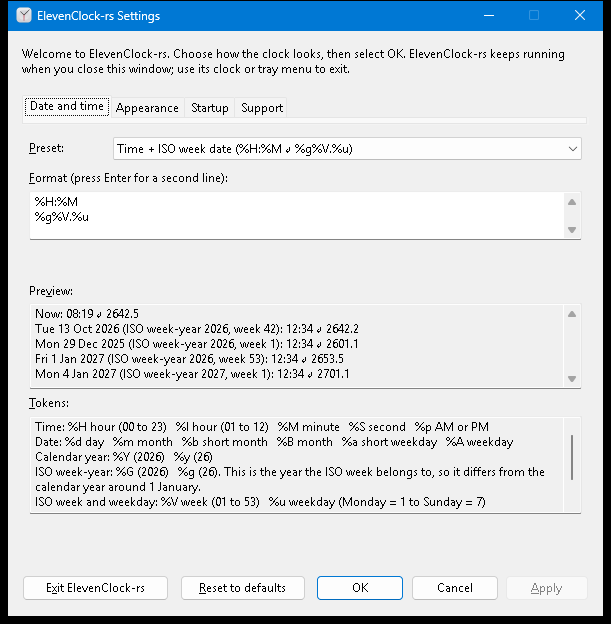
Pick a preset or write your own with simple tokens: hours, minutes, seconds, weekdays, months, calendar years and ISO weeks, on one line or two. A live preview checks it before it reaches your taskbar.
ElevenClock-rs puts your own date and time format on the Windows 11 taskbar: ISO week dates, seconds, a second line, whatever you need. Native, tiny and free.
Free and open source · Windows 11 x64 · No administrator rights
Pick a preset or write your own with simple tokens: hours, minutes, seconds, weekdays, months, calendar years and ISO weeks, on one line or two. A live preview checks it before it reaches your taskbar.
About 3 MiB of memory and around 0.01% CPU. No busy loop: the clock only redraws when its text changes.
The Windows clock is never changed or disabled. ElevenClock-rs draws on top of it, so clicking still opens the calendar, and exiting brings the original straight back.
Show your clock on the primary taskbar or on every monitor, at any scaling. It follows auto-hide, full-screen apps and Explorer restarts.
Written in Rust as a single executable: no Python, Qt or runtime to install. Installs for your account without administrator rights, or runs portable.
No developer telemetry; update checks are optional. Works with screen readers, the keyboard and high contrast. Light and dark themes follow Windows.
Build your clock with pieces, drag them into order, or edit the format directly. Copy the format or share a template with its font size and theme.
Click a piece to add it. Drag to reorder, or select a piece and use the move buttons.
%H %I | Hour, 24 / 12 hour |
%M %S %p | Minute, second, AM/PM |
%Y %y | Calendar year, full / two digits |
%G %g | ISO week-year, full / two digits |
%V %u | ISO week 01–53; weekday Monday=1 to Sunday=7 |
%m %d | Month, day |
%a %A | Weekday, short / full |
%b %B | Month name, short / full |
%% | A literal percent sign |
Every change is previewed against tricky dates, like the week that spans New Year. A format that is invalid or does not fit the taskbar is explained and never applied. Apply, Cancel and Reset work the way you expect.
Start at sign-in is off until you turn it on, and diagnostics are only ever copied to your clipboard, never sent anywhere.
ElevenClock-rs-…-x64-setup.exe from thelatest release.For your own PC. Run the setup file for a per-user installation, Start menu shortcut and Windows uninstaller. Template links are registered for your account when available.
Installation guideFor a copy you manage yourself. Extract it to a writable folder and runelevenclock-rs.exe. Exit and replace the executable to update; enable template links in Settings if you want them.
For organizations. A deployment manager maintains a central copy; the launcher updates and starts each user’s local app. Includes separate user and manager guides, plus optional organization inventory.
Managed deployment guideAll three run for your Windows account without elevation. A deployment manager is an organizational role, not a Windows administrator account. Use one mode per account; the installer and managed copy share a folder and cannot coexist.
Releases are not code-signed yet, so Windows may say “Windows protected your PC”. Choose More info, thenRun anyway. Each release lists SHA-256 checksums.
Coming from the original ElevenClock? Quit it and switch it off inSettings > Apps > Startup first; themigration guideexplains what changed.
No. It draws its own clock on top of the Windows one and never modifies, disables or hides it. Exit ElevenClock-rs, or pause it from the tray, and the Windows clock is right there.
Stock Windows 11 on an x64 PC. Windows 10, ARM64 devices, Insider builds, taskbar replacements such as ExplorerPatcher or StartAllBack, and taskbars on the side or top of the screen are not supported.
A compact way to write a day as year, week and weekday: 2642.2is 2026, week 42, Tuesday. Weeks start on Monday and week 1 contains the year's first Thursday, so the week-year can differ from the calendar year around New Year.
ElevenClock-rs is an independent Rust rewrite, inspired byElevenClock by Martí Climent. It focuses on a custom format with a tiny footprint; some features of the original, like internet time sync and translations, are not included. It is not affiliated with or endorsed by the original project.
For the installer, exit the app and uninstall fromWindows Settings > Apps > Installed apps. For a portable copy, disable startup and template links in Settings, exit, then delete its folder. For a managed copy, ask your deployment manager; the managed guide explains removal. Saved preferences and local presets are retained.
Open Settings > Support, click Copy diagnosticsand paste it into a new issue. The report contains no user name, paths or window titles.