Native Settings and the preference flow
What the user gets
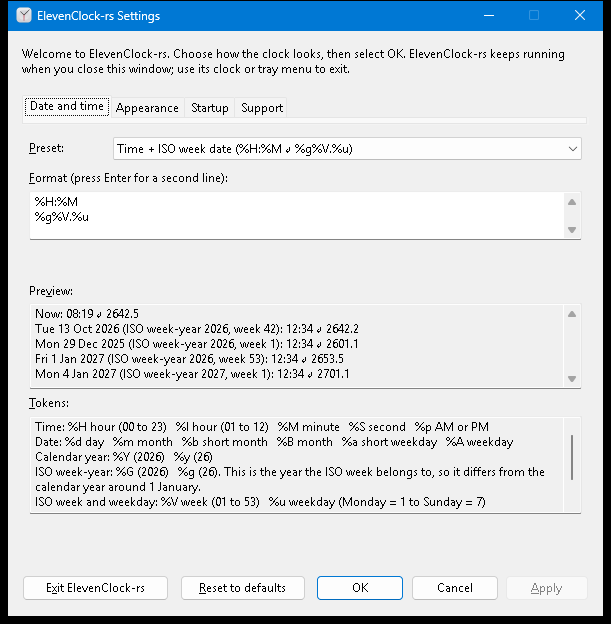
One window, five pages (a tab strip; Ctrl+Tab, Ctrl+Shift+Tab and
Ctrl+PageUp/PageDown also switch pages):
| Page | Contents |
|---|---|
| Date and time | Preset list (from clock_core::format::PRESETS, plus Custom format), multi-line format editor, live preview, token help |
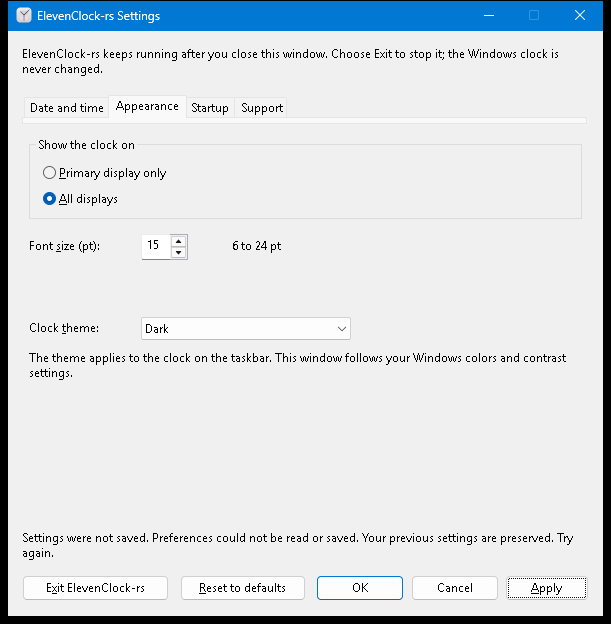
| Appearance | Primary display only / All displays, font size 6–24 pt with spin buttons, clock theme System / Light / Dark |
| Startup | The opt-in login-startup checkbox (details). It is the Windows registration itself, not a stored preference, so nothing can drift from the OS-owned state |
| Support | Status, Refresh status and Copy diagnostics (details) |
| Templates | Review a shared link, share the current presentation, save/load/delete named local presets, open the website editor and enable/disable per-user template links (details) |
Below every page, Settings shows the running app version, taken from the same Cargo workspace version as the executable’s file properties. GitHub Releases opens GitHub Releases in your default browser. Check now makes one bounded GitHub request on a worker, only when clicked. The disabled button shows “Checking…” while Settings remains usable. The status says “You have the latest version.”, “Version X.Y.Z is available”, or “Couldn’t check for updates.” An available result makes GitHub Releases open that release’s validated page, and explains updating: run the new setup, or exit and replace the portable exe. Nothing is downloaded or installed.
Check for updates automatically starts unchecked for new installs and upgrades. Apply or OK saves consent; Cancel discards it. There is no first-run prompt. When enabled, a one-shot timer waits at least three minutes after startup, resume or unlock, and checks at most once per 24 hours. Failed checks are quiet and wait for the next daily opportunity. A manual check also advances that deadline. One tray notification per newer version says “ElevenClock-rs X.Y.Z is available”; clicking opens the validated release page. Windows may suppress notifications (for example, Do Not Disturb); they are not retried.
Both buttons support Tab then Enter or Space; status changes are announced to screen readers. A release-opening failure appears in the Settings status. Closing Settings cancels a manual check; automatic checks continue without the dialog. Turning the option off, locking, suspending or pausing cancels automatic work and removes its wakeup; late results cannot notify. Exit never waits for the network. Requests time out after ten seconds overall, accept at most 64 KiB, never overlap, and respect server rate-limit backoff, persisted across restarts. Managed copies show “managed by your organization” beside the version, hide both buttons and the automatic checkbox and reject request dispatch, because their launcher handles updates. See ADR 0003 for data sent and GitHub retention.
Buttons: Exit ElevenClock-rs, Reset to defaults, OK, Cancel, Apply.
The window uses the Windows 11 text font (Segoe UI Variable) and the Mica material
behind its title bar, through the documented DWMWA_SYSTEMBACKDROP_TYPE. The client
area keeps standard themed controls, so it follows high contrast and screen readers
unchanged; Windows builds without Mica simply show the plain title bar.
Flow
| Action | Result |
|---|---|
| Edit anything | Draft only. Messages and the preview update as you type; nothing is live or saved. Apply enables once the draft differs from what is live |
| Apply | Validate, check fit, save, and only then tell the running clock (Input::Preferences). The clock changes without a restart; the window stays open and says “Settings applied.” |
| OK | Apply, then close. With no changes it simply closes |
Cancel, Esc, the close button, Alt+C | Discard the draft and close. The clock keeps running |
| Reset to defaults | Stage the defaults in the controls. Nothing is saved until Apply; Cancel drops them |
| Save fails | “Settings were not saved. … Your previous settings are preserved.” The live clock is unchanged, the draft stays editable, the window stays open and Apply can simply be retried (capture) |
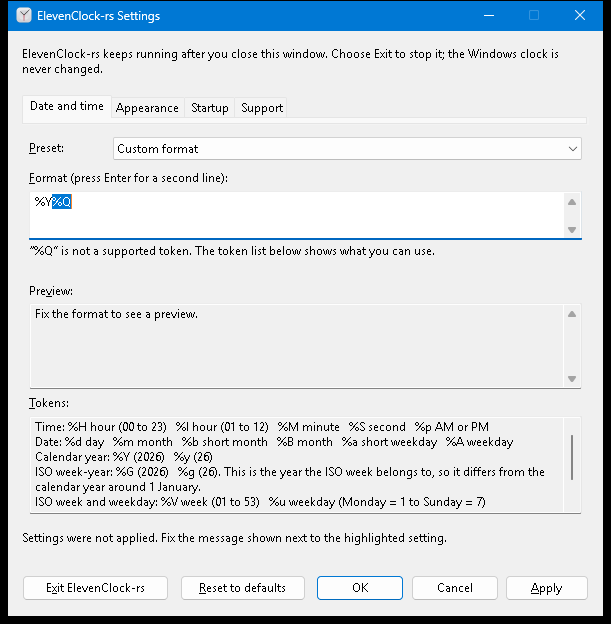
| Invalid draft | Apply refuses, says so, moves the keyboard to the first problem and selects the offending token (capture) |
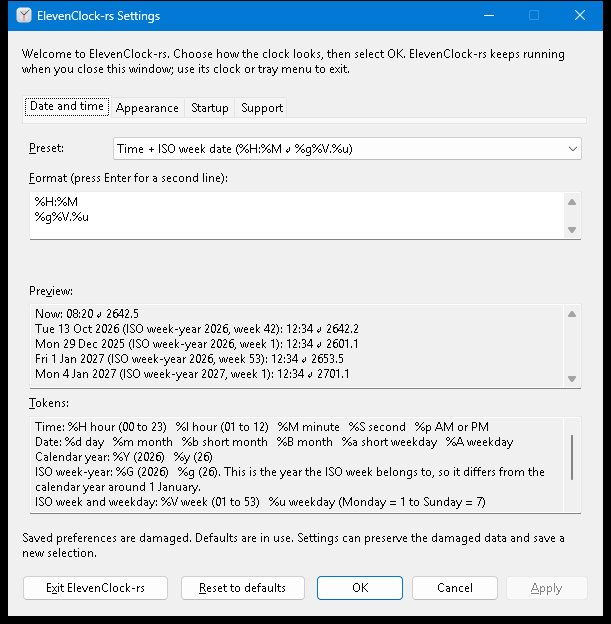
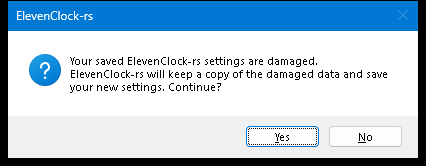
| Damaged saved data | A notice at the bottom; defaults are shown. Apply asks for confirmation, keeps a copy of the damaged data, then saves (notice, confirmation). Declining changes nothing |
| Saved data from a newer version | Everything is disabled and the notice says saving is turned off; the data is never overwritten |
| First launch | Welcome text; first-run completion is stored internally when the window is dismissed. Later launches show the normal text. A login-style start never opens Settings |
| Launch while running / tray or clock menu Settings | The running instance shows or focuses the one window. An already-open window keeps its unsaved edits |
| Exit | Explicit: removes the overlay, tray icon and helper. Closing never exits |
Preview and year-boundary semantics
The preview always shows the current time and the documented examples, with the ISO
week-year each belongs to, so the difference between %g (ISO week-year) and %y
(calendar year) is visible instead of implied:
| Sample (12:34:56) | %g%V.%u (ISO week date) | %y%V.%u (Calendar year + ISO week) |
|---|---|---|
| Tue 13 Oct 2026 (ISO week-year 2026, week 42): the fixture | 2642.2 | 2642.2 |
| Mon 29 Dec 2025 (ISO week-year 2026, week 1) | 2601.1 | 2501.1 |
| Fri 1 Jan 2027 (ISO week-year 2026, week 53) | 2653.5 | 2753.5 |
| Mon 4 Jan 2027 (ISO week-year 2027, week 1) | 2701.1 | 2701.1 |
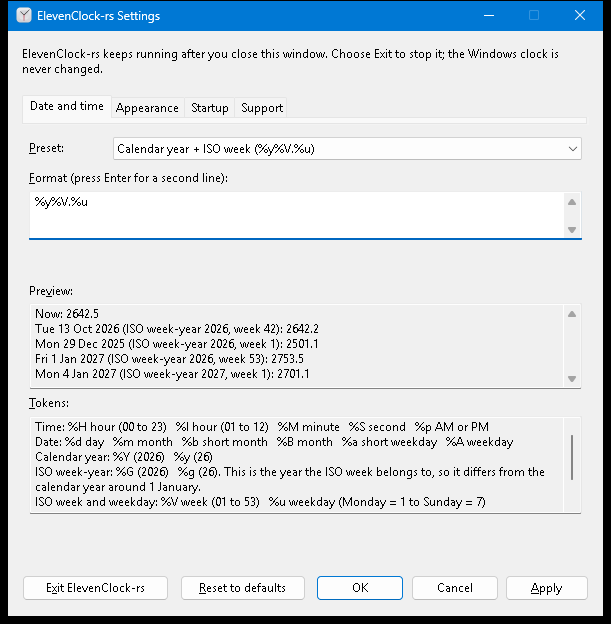
The token help beside the editor lists every directive the core accepts (a test
compares it with format::DIRECTIVES) and explains that %G/%g are the year the
ISO week belongs to. Two-line formats show line 1 ↵ line 2.
Messages (always beside the control)
| Input | Message | Where |
|---|---|---|
%Q | ”“%Q” is not a supported token. The token list below shows what you can use.” | Under the format editor; the token is selected on Apply |
trailing % | “A % must be followed by a token. Use %% to show a percent sign.” | same |
| empty / empty line | “Enter a format, or choose a preset.” / “Each line needs some content…” | same |
| three lines, control characters, > 256 characters, > 512 rendered | one sentence each (see settings_model::format_problem) | same |
font 30, 5, empty, abc | “Font size must be between 6 and 24 pt.” | Under the font size |
| does not fit | “This does not fit the clock space on the primary taskbar (needs 94 × 40 px, 70 × 48 px available) and a secondary taskbar (…). Use a shorter format or a smaller font size.” | Under the format and under the font size |
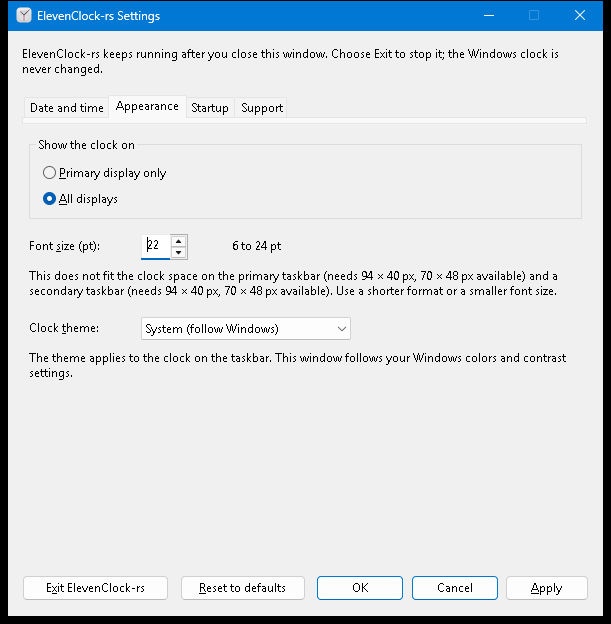
Fit is measured, not guessed: Runtime hands the draft to the same DirectWrite
measurement the overlay surface uses (Renderer::plan_fit), against the clock slot
discovered for each taskbar the selection would use, at that taskbar’s DPI, using the
same worst-case lines (leap day, ISO week 53, AM/PM). If a taskbar has no proven clock slot, or nothing was discovered yet,
there is nothing to measure and Apply is not blocked; the paint path still reports a
later overflow, and Settings shows that as a notice when it is open.
Implementation notes
- All rules live in the portable
clock_windows::settings_model(Draft,SettingsController,Evaluation,Problems,ApplyOutcome,LayoutCheck) and are unit-tested on any OS with a fake store and a fake layout. SettingsWindowowns thePreferenceSessionand is serviced from the one message loop. Window procedures only queue values; nothing re-enters the runtime from a callback.preferences_store::UnavailableStoreis used when the per-user data folder cannot be resolved: the clock runs on defaults, and every save fails visibly instead of being lost at the next start.- Multi-line edit controls send no
EN_CHANGEwhen their text is set from outside the process (automation, some assistive technology), so the controls, not the notifications, are read at the start of every command. Input that arrives as a sent message never wakesGetMessageW, so each queued event also posts a wake message to the dialog.
Fit-check caching
Settings retains one draft format’s sampled worst-case candidates. Repeated fit checks reuse successful measurements while rendered text, selected clock slots, DPI, font size and the runtime appearance/font revision are unchanged. A different format replaces the candidate cache; unavailable or failed measurements are never cached as successful fits. Both caches are bounded to the current draft/check. Operation-count guards for this cache and for the worst-case resampling are listed in contributing.
Action audit
Audited for issue #82: the existing small typed interaction::MenuCommand model
already owns command IDs and the fixed menu. No additional action abstraction is
needed for current behavior.
| Entry points | Policy and dispatch owner | Existing evidence |
|---|---|---|
| Clock right click; tray mouse, keyboard and context-key activation | Queue Interaction::Menu; native pump routes to UserAction::ShowMenu; interaction::menu_items and Runtime::command share Settings, Pause/Resume and Exit | tray decoder tests; runtime/tests.rs menu dispatch and tray coalescing tests |
| Clock click; screen-reader Invoke | Queue activation; runtime checks the current overlay and activation gate before the native calendar action | interaction press/gate/queue tests and runtime activation tests; hosted overlay harness for native input/UIA |
| Menu Settings; second-instance launch | Native show request converges on SettingsWindow::show_or_focus; an existing draft is retained | Settings desktop harness for window/focus behavior |
| Menu Exit; Settings Exit; host close/session end | Menu calls runtime quit; Settings/host queue Exit, pumped as Input::Quit; runtime owns teardown | Runtime menu-exit, quit and end-session tests; lifecycle harness for native teardown |
| Apply/OK; Reset; Cancel/close | Settings controller owns validation/save/recovery; OK closes only after success, Reset stages a draft, Cancel discards it | settings_model and preferences_store portable tests; Settings desktop harness |
| GitHub Releases / Check now | Settings queues owned commands; managed policy guards both UI and native request dispatch. GitHub Releases opens the validated release URL; Check now starts one cancellable worker and posts a result wakeup | Portable response, version, backoff and cancellation-policy tests; Windows-only WinHTTP loopback tests for response decoding, redirects, rate limits, streamed overflow, deadlines, cancellation and callback cleanup; desktop harness checks accessible names and tab order. Live GitHub/offline behavior and screen-reader announcements require Windows desktop verification |
| Startup checkbox; Support Refresh/Copy | Separate typed startup/support policies, serviced outside callbacks; startup changes require explicit user action | Startup/support portable tests and native registry/clipboard tests |
Pause/Resume is available through the shared menu; Settings does not duplicate it. Settings opening and Exit are unconditional requests, so their small native adapters contain no competing availability policy. Unsupported preference versions disable saving in the Settings model and remain protected at the store boundary. These layers enforce different boundaries rather than duplicating action policy. Revisit this audit when adding an entry point or conditional action; centralize proven shared availability/behavior in portable typed logic and test every affected source. Do not unify draft commands, OS registration and clock actions speculatively.