Support status, Copy diagnostics and local logs
What the user gets
Settings → Support (reachable by Ctrl+PageDown or the tab strip) looks like this:
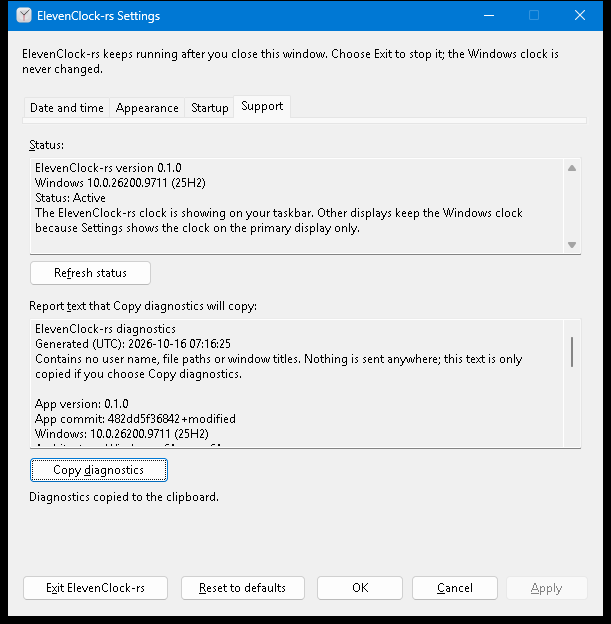
| Control | Behaviour |
|---|---|
| Status (read-only text) | App version, Windows build, a one-word state and a plain explanation. When the native clock is showing, the text says why and what to do (see the table below) |
Refresh status (Alt+F) | Asks for a fresh, bounded discovery. The window stays responsive; the line below the page says “Checking the taskbars…”, then “Status refreshed.” |
| Report text that Copy diagnostics will copy (read-only, selectable) | Exactly the text that will be copied |
Copy diagnostics (Alt+D) | Writes that text to the clipboard only on this click. The line below the page says “Diagnostics copied to the clipboard.” or what went wrong |
Tab order on the page: status, Refresh status, report, Copy diagnostics. The result line
raises a screen-reader alert (EVENT_SYSTEM_ALERT) whenever it changes, the same way
Settings’ main status line does.
Status states
| State | When | What it says to do |
|---|---|---|
| Active | The clock is on every selected taskbar | Nothing. Displays the user left out in Settings are mentioned, never counted as a problem |
| Active on some taskbars | At least one but not all selected taskbars | Names each remaining taskbar and why |
| Active, clock hidden for now | Hidden by design (full screen, locked, taskbar auto-hidden) | It returns by itself |
| Paused | The user paused from the clock/tray menu | Choose Resume |
| Windows clock in use | Position unverified, unusable geometry, text does not fit, draw/placement failure, calendar action failed, discovery failed, Explorer not running, discovery turned off | One actionable sentence per cause: shorter format or smaller font, Pause then Resume, restart Explorer, Exit and start again, “this Windows version may not be supported yet” |
| Looking for the taskbar | Discovery has not answered yet | Wait |
The report
A real sample, produced by the harness on the machine above:
ElevenClock-rs diagnostics
Generated (UTC): 2026-10-16 07:16:25
Contains no user name, file paths or window titles. Nothing is sent anywhere; this text is only copied if you choose Copy diagnostics.

App version: 0.1.0
App commit: 482dd5f36842+modified
Windows: 10.0.26200.9711 (25H2)
Architecture: Windows x64, app x64

Clock replacement: Active
Summary: The ElevenClock-rs clock is showing on your taskbar. Other displays keep the Windows clock because Settings shows the clock on the primary display only.
Paused by user: no
Windows Explorer running: yes
Taskbar discovery: last attempt succeeded

Taskbars: 2
1. Primary taskbar: clock replaced
   Monitor: 1280x720 px at (0, 0), DPI 96 (100%)
   Discovery strategy: UI Automation; clock located: yes
2. Secondary taskbar: not used: this display is not selected in Settings (Appearance)
   Monitor: 1280x720 px at (1280, 0), DPI 96 (100%)
   Discovery strategy: UI Automation; clock located: yes
A managed copy (ADR 0004) adds two lines after
Architecture: and the Status text shows “(managed by your organization)” after the
version. The sample above predates them; a current report has Managed: no and
Startup: off there:
| Line | Values |
|---|---|
Managed: | yes when elevenclock-rs-launcher.exe sits in the app’s own folder, otherwise no. Checked again each time Settings opens |
Startup: | Which program the sign-in entry starts: app, launcher (the sibling launcher), off (no entry, or Windows has it turned off) or stale (registered for something else). Never a path |
It is plain text for a person, with no schema: the layout may change between versions
and nothing parses it. The commit is recorded by clock-windows/build.rs (+modified
marks a build from uncommitted changes; unknown means no git checkout).
Privacy
- By construction the report has no field for a user name, a path or a window title:
it is built only from the runtime’s
Diagnosticsvalue plus version/OS facts. - Free text (failure reasons from the platform) goes through
support::redactbefore it is written: the signed-in user’s profile folder and everything after it, any otherC:\...,C:/...,\\server\...or\\?\...path becomes<path>, and the user name becomes<user>(case-insensitive, whole words only). Reasons are also flattened to one line and cut at 200 characters. - Copy diagnostics stays local: it only copies this text to the clipboard. There is no telemetry, upload or crash reporter. The app’s only network request is Check now in Settings or automatic checks after explicit opt-in (off by default) (ADR 0003); managed copies never check GitHub. GitHub receives the IP and app version, never the report. Diagnostics record manual only, automatic, or disabled (managed), and the last result kind only, without URLs, response bodies, headers, IPs or raw network errors.
Bounded refresh, with no blocking
Runtime::refresh_status() requests the ordinary discovery as if the display layout had
changed (a 250 ms settle, then the existing helper process with its five second
deadline, never UI Automation on the UI thread). The answer arrives as a normal
Input::Discovery, which bumps Diagnostics::discovery_completed. RefreshWatch (pure,
in support) turns that into Waiting / Done / TimedOut:
| Situation | Result |
|---|---|
| Answer arrives | “Status refreshed.” and the page shows the new state |
| Helper fails or hits its deadline | Still an answer: a failure report, shown with its reason (“Taskbar discovery did not finish in time.”) |
Nothing arrives within 10 s (REFRESH_LIMIT) | “Checking the taskbars took too long. Showing the last known status. Choose Refresh status to try again.” |
| Discovery is turned off for the session | Done at once; the status explains it |
| Refresh clicked again while one is running | “Still checking the taskbars.”; no second request |
The Refresh button is never disabled, so the keyboard cannot be stranded on a disabled control. The page rewrites its text only when the diagnostics changed.
Copy diagnostics and the clipboard
support::WindowsClipboard writes CF_UNICODETEXT in this order, so every failure that
can happen before the old contents are replaced leaves them alone:
- Allocate and fill the global memory. Failure → “Windows is low on memory.” Clipboard untouched.
OpenClipboardwith the dialog as owner, up to 5 attempts 10 ms apart (about 40 ms on the UI thread, in total). Failure → “Another program is using the clipboard. Wait a moment and choose Copy diagnostics again. Your clipboard was not changed.”EmptyClipboard, thenSetClipboardData. If the second call fails the message says “The clipboard was cleared.” instead (the only window in which contents are lost; Windows offers no atomic replace).
Bounded local log
logging::RotatingLog keeps elevenclock-rs.log, .1.log and .2.log in
%LOCALAPPDATA%\ElevenClock-rs\logs: at most three files of 1 MiB (MAX_FILE_BYTES,
MAX_FILES), a line is cut at 1 KiB, and rotation happens before a write could exceed
the limit. It logs transitions, not repaints: a taskbar’s outcome changing, a
discovery failure or recovery, pause/resume, discovery turned off, a refresh request,
a copy, a failed save, start and stop, and a panic message. Runtime::transition_lines
compares against what it last logged, so a minute of ticks writes nothing.
The managed launcher (ADR 0004) writes the same
bounded log under its own name, launcher.log, launcher.1.log and launcher.2.log
beside the app’s files (RotatingLog::named), through the same redaction. It records
one line per decision (updated, unchanged, skipped: running, source unreachable,
source invalid: ..., refused: installed copy, started) and never a path or user
name. The Copy diagnostics report does not read these files.
Every write error (no folder, disk full, locked file) is swallowed and the next write
starts from a fresh look at the disk. Only the primary instance logs. Lines pass through
support::redact. Sample from the harness run:
2026-10-16T07:12:32Z ElevenClock-rs 0.1.0 started
2026-10-16T07:12:33Z primary taskbar 1: clock replaced
2026-10-16T07:12:33Z secondary taskbar 2: clock hidden for now: this display is not selected in Settings (Appearance)
2026-10-16T07:12:42Z status refresh requested
2026-10-16T07:12:44Z diagnostics copied to the clipboard
2026-10-16T07:12:48Z ElevenClock-rs stopped
Where the code is
The dependency direction is app → windows, but Settings (in clock-windows) must show the report and the runtime
(in clock-windows) produces the transition lines, so the report and the writer live
in clock-windows:
| File | Owns |
|---|---|
clock-windows/src/support.rs (+ support/native.rs) | Status wording, report, redaction, RefreshWatch, clipboard wording and trait; Windows build/architecture; the clipboard |
clock-windows/src/logging.rs | RotatingLog, global best-effort log, init |
clock-windows/build.rs | Records the commit |
clock-windows/src/runtime.rs | Diagnostics gains monitor bounds, DPI, strategy, clock_located, shell_running, discovery_pending, discovery_completed; refresh_status; transition_lines |
clock-windows/src/settings.rs, clock-app/resources/settings.rc | The Support page |
clock-app/src/logging.rs | Starts logging, panic hook, start/stop lines |
No dependency was added (tracing and clap are not used); the clipboard APIs are
listed in clock-windows/bindings.txt. preferences_store::app_data_dir is the one
Known Folder lookup, now shared by preferences and logs.
Known limits
- Clipboard access waits up to about 40 ms on the UI thread; that is the price of an immediate, predictable result instead of an asynchronous retry.
- If
SetClipboardDataitself fails after the clipboard was emptied, the old contents are gone (the message says so). - Logging starts after the single-instance check, so a launch that only signals the running copy does not log, and failures before the primary instance exists are not logged.
- Per-taskbar ids in the log are process-local and restart at each Explorer generation.